Published 14th June 2026
Tracking Compromised Packages Across 9 Ecosystems with ThreatPkg
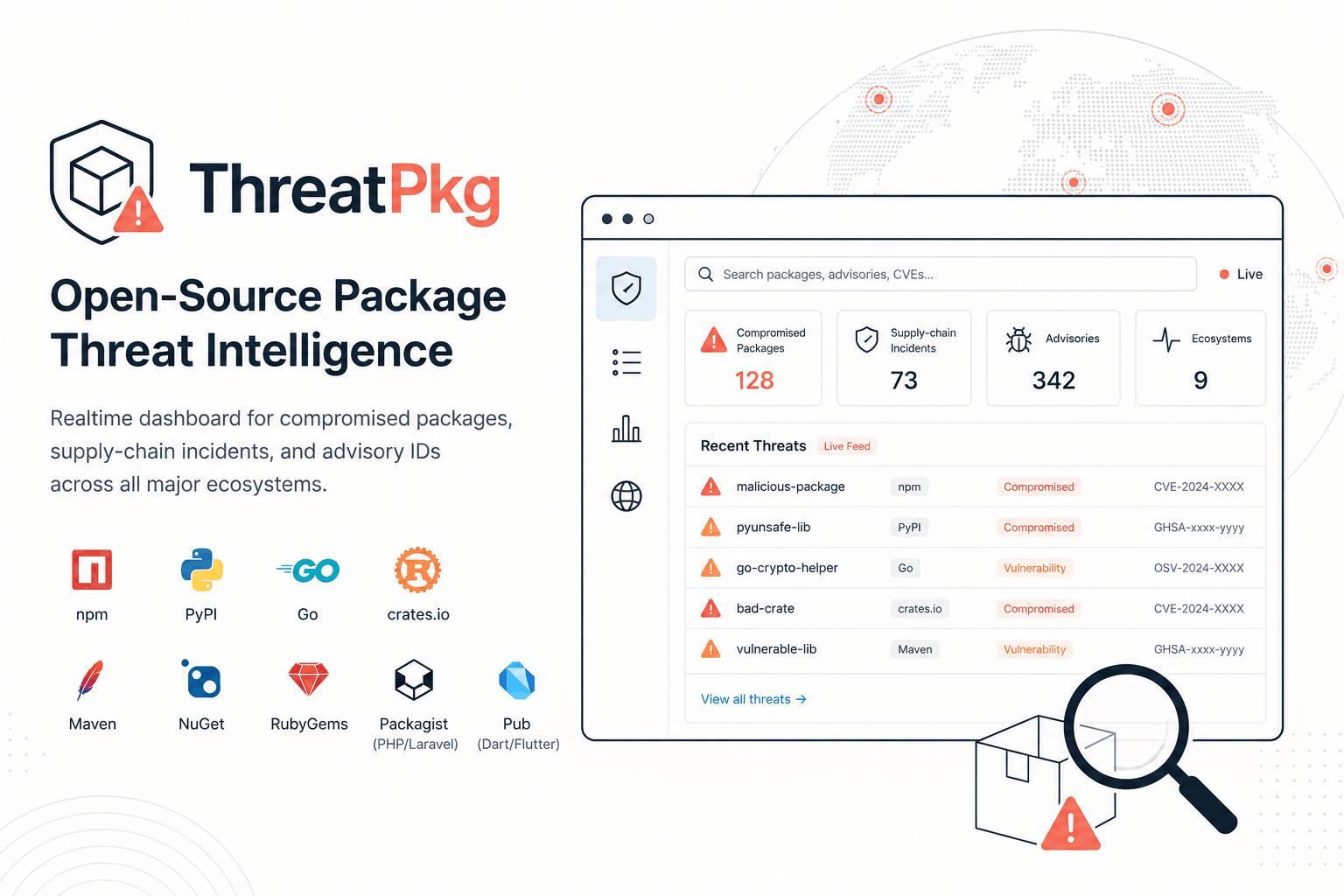
ThreatPkg is a free, public dashboard for tracking compromised open-source packages and supply-chain incidents across 9 ecosystems — no sign-up, no paywalls.

Supply chain attacks on open-source packages are not a new problem, but they're getting worse. The XZ Utils backdoor in 2024 came within a hair's breadth of compromising SSH on millions of Linux systems. The event-stream incident in 2018 showed how a single malicious maintainer could poison a package with 2 million weekly downloads. These aren't edge cases — they're a pattern, and the frequency is increasing.
The frustrating part isn't that these incidents happen. It's that most developers don't find out until well after the damage is done.
The Problem
When a package gets compromised, the information doesn't land in one place. It shows up across GitHub Security Advisories, OSV databases, vendor blog posts, and Twitter threads — scattered, inconsistent, and ecosystem-specific. If you work across stacks (say, a Node.js frontend, a Python data pipeline, and a Go service), you're looking at three separate places to monitor, each with different formats and update cadences.
I wanted one dashboard that showed me what was happening across all my ecosystems, right now. That thing didn't exist, so I built it.
What ThreatPkg Does
ThreatPkg is a free, public, real-time dashboard for open-source package threat intelligence. It covers 9 ecosystems:
npm · PyPI · Go · crates.io · Maven · NuGet · RubyGems · Packagist · Pub (Dart/Flutter)
Here's what you get on the dashboard:
- Live threat feed with filters by ecosystem, severity, threat type, and time range
- Incident detail pages with markdown-rendered advisories, timelines, affected versions, and indicators of compromise (IOCs)
- Per-package reputation scores and full incident history for any package
- Dependency scanner — upload your lock file or manifest and check your pinned versions against known malware incidents using a local index backed by live OSV queries
- Advisory IDs (CVE, GHSA, OSV) surfaced on every incident
No account. No paywalled feeds. No "upgrade to see the full advisory." Just the data.
The Tech Stack
I built ThreatPkg on Nuxt 4 with its Nitro server backend. Nuxt handles both the frontend and the API layer in one project, which kept things simple — no separate Express server, no context-switching between repos.
PostgreSQL with Drizzle ORM handles data storage. Drizzle gives you type-safe queries without the weight of a full ORM, and it's straightforward to reason about at the schema level. The relational model was a natural fit here since incidents have timelines, packages have histories, and those relationships matter.
Bun is the runtime and package manager. Faster installs, faster cold starts locally — nothing dramatic to say about it, it just works.
The UI is built with Nuxt UI and Tailwind CSS. I wasn't trying to win a design award here; I wanted a functional three-column dashboard (metrics, ecosystem distribution charts, inspector panel) that was fast to build and easy to scan. Light and dark modes are supported, with the preference stored in localStorage.
Vitest handles unit tests.
Where the Data Comes From
Two sources feed the threat intelligence:
OSV (Open Source Vulnerabilities) is the primary data source. It's an open, cross-ecosystem, machine-readable vulnerability database maintained by Google and the community. It covers malware, vulnerabilities, and supply chain incidents across most major ecosystems in a consistent schema — which is exactly what you need when you're normalizing data across 9 different package registries.
GitHub Advisories API is an optional secondary source. You can provide a GitHub token to get higher rate limits on advisory data, but it's not required.
Sync runs every 30 minutes locally via a Nitro task. In production on Vercel, a Cron Job handles the daily sync. The sync endpoints are protected with a secret header to prevent abuse.
The Dependency Scanner
This is the feature I use most. The idea is simple: take your actual lock file or manifest, parse the pinned versions, and check them against the malware incident index. If a version you have pinned has a known incident, you'll see it flagged.
The check runs against a local index first for speed, then falls back to a live OSV query for anything that isn't cached. This keeps it responsive even for large manifests.
The reason pinned versions matter specifically (not just "latest") is that a lot of supply chain attacks target specific version ranges, and your lock file is the source of truth for what's actually on your system. Checking "latest" is noise; checking what you've actually pinned is signal.
A Few Things I'd Do Differently
Data freshness. A 30-minute sync interval is fine for most purposes, but there's a gap between when an incident is first reported and when it lands in OSV. Real-time webhooks from registry security feeds would close that gap, but it adds significant infrastructure complexity. For now, the trade-off is acceptable.
Schema normalization across ecosystems. OSV does a good job standardizing, but there's still meaningful variation in how different ecosystems report affected version ranges, severity ratings, and IOC detail. A lot of the work was in the normalization layer, not the data fetching.
og:image on Vercel. One gotcha: NUXT_PUBLIC_SITE_URL needs to be set to your custom domain explicitly in Vercel environment variables. Without it, the og:image host attribution breaks and social previews point to the wrong domain.
What's Next
A few things on the roadmap:
- A CLI tool or CI integration so you can run the dependency scanner as part of your pipeline
- Webhook alerts for specific packages you're watching
- Potentially more ecosystems as OSV coverage expands
Try It
ThreatPkg → dub.sh/tpkg
GitHub → github.com/aksharahegde/threatpkg
It's free, no sign-up required. Drop your lock file into the scanner, set the feed to your primary ecosystem, and see what comes up. If you find something broken or have a feature request, open an issue on GitHub.
The supply chain problem isn't going away. The least we can do is make the information easier to find.
Thank you Akshara Hegde
To read the full article, click the link below.
https://aksharahegde.xyz/blog/tracking-compromised-packages-threatpkg